
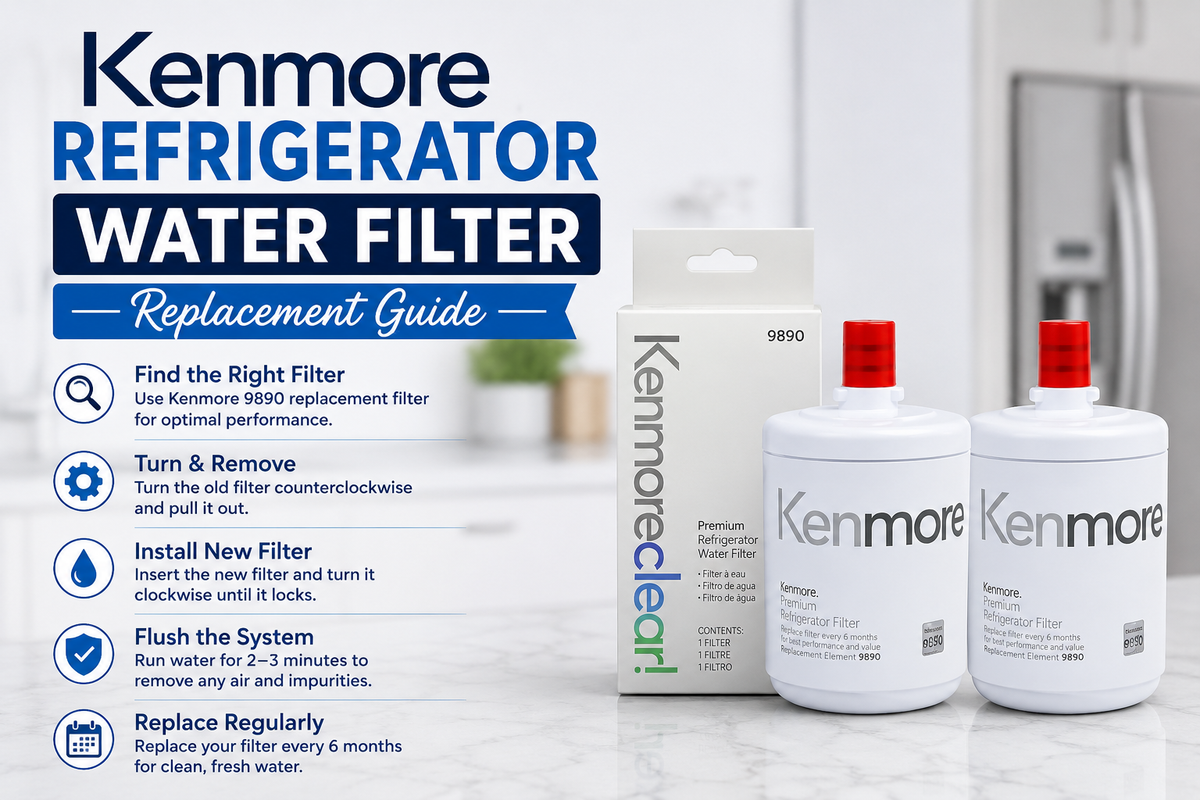
Replacing your Kenmore refrigerator water filter on time is one of the simplest ways to keep your drinking water and ice tasting fresh. This Kenmore refrigerator water filter replacement guide walks you through the entire process so you never have to guess what to do next, whether this is your first swap or your fifth.
An old filter does more damage than most people expect. It can slow down water flow, let odors creep back into your ice, and even let chlorine taste return to your glass. In this guide you will learn how often to replace your filter, how to spot the warning signs, and exactly how to swap in a new one in just a few easy steps.
How Often Should You Replace a Kenmore Refrigerator Water Filter?
Most Kenmore refrigerator water filter replacement schedules follow a six month rule. That said, your actual timeline can shift based on how much water your household uses.
A few factors can push replacement sooner rather than later. Large families, frequent ice maker use, and naturally harder water all shorten a filter's useful life. If your home uses the dispenser constantly throughout the day, do not be surprised if six months feels a bit long.
Your refrigerator's built-in filter indicator is a helpful guide, but it works off average usage estimates. Pay attention to water taste and flow as well, since these often signal a needed Kenmore water filter replacement before the light ever turns on.
How to Know When Your Kenmore Water Filter Needs Replacement
Slow water flow is usually the first sign people notice. If your dispenser takes noticeably longer to fill a glass, the filter is likely close to its limit.
Changes in water taste or odor are another clear signal. Water that once tasted clean and neutral may start to taste stale or slightly off.
Filter indicator alerts exist for a reason. Once that light turns on, it is best to plan your replacement within the next week or two rather than waiting it out.
Ice quality or water dispenser issues often go hand in hand with a worn out filter. Cloudy ice, smaller cubes, or a dispenser that stutters can all point back to the same cause.
Visible signs of an old or damaged filter, such as discoloration or a cracked housing, mean it is time for a Kenmore refrigerator filter change without any further delay. Waiting past this point rarely helps and often means a Kenmore refrigerator filter replacement becomes more urgent than it needed to be.
What You Need Before Replacing a Kenmore Refrigerator Water Filter
Getting the correct replacement filter is the most important step in this entire process. Every Kenmore model uses a specific filter, so double check yours before ordering. This single check is often the difference between a smooth swap and a frustrating lesson in how to replace a Kenmore refrigerator water filter the hard way.
Clean hands and a clear work area make the swap much smoother. A small towel nearby also helps catch the little bit of water that often drips out during removal.
Checking your exact refrigerator model number, usually found inside the fridge compartment, confirms you are ordering the right part. This single step prevents most of the frustration people run into during Kenmore water filter installation.
Filter compatibility matters more than people realize. A filter that looks similar but does not match your model can leak, fit loosely, or fail to filter properly at all.
How to Replace a Kenmore Refrigerator Water Filter
If you have never done this before, knowing how to replace a Kenmore refrigerator water filter step by step makes the whole task feel far less intimidating. Follow the seven steps below in order.
Step 1: Locate the Water Filter
Most Kenmore refrigerators keep the filter inside the upper right corner of the fridge compartment or built into the grille at the base of the unit, a setup similar to how most refrigerator water systems are designed. Check your manual if you are unsure where yours sits.
Step 2: Prepare the Refrigerator
Some models require you to pause the dispenser or press a release button before removing the filter. A quick look at your manual saves you a few confused minutes here, and it is a helpful first move whenever you are learning how to replace a Kenmore refrigerator water filter for the first time.
Step 3: Remove the Old Filter
Turn the filter counterclockwise or press the release tab, depending on your model, and gently pull it free. Expect a small amount of water to drip out during this step.
Step 4: Prepare the New Filter
Remove any protective caps from the replacement filter and check that the rubber seals or O-rings look intact before installation.
Step 5: Install the Replacement Filter
Slide the new filter into place and turn it clockwise until it clicks or locks securely. A properly seated filter should feel snug rather than loose.
Step 6: Reset the Filter Indicator
Most Kenmore models let you reset the indicator by holding a button on the control panel for a few seconds. Check your manual for the exact combination for your unit.
Step 7: Flush the New Filter
Run several gallons of water through the dispenser before drinking it. This clears out any loose carbon particles left over from manufacturing and helps the filter start working at full strength.
Kenmore Refrigerator Water Filter Models
Kenmore refrigerators use several different filter models depending on the exact unit you own. Some of the more common ones include Kenmore 9081, Kenmore 9082, Kenmore 9083, Kenmore 9084, Kenmore 9085, Kenmore 9890, and Kenmore 9990.
Each of these models fits a specific range of refrigerators, so one filter number rarely works across every Kenmore unit. Always verify exact filter compatibility before purchasing or installing a replacement, since even small numbering differences can mean a different fit or flow rate. If you own a Kenmore 9081 or 9083, our step by step guides on how to replace water filter Kenmore 9081 and how to replace Kenmore water filter 9083 walk through the process for those specific models.
Common Problems After Replacing a Kenmore Water Filter
Water Flow Is Slow
This is often caused by trapped air in the line. Running water for a minute or two after installation usually clears it up.
Water Has an Unusual Taste
A strange taste right after installation is normal at first. If it continues after a full flush, double check that you are using a genuine Kenmore fridge water filter rather than an incompatible substitute. A mismatched Kenmore fridge water filter is one of the most common reasons taste problems continue past the first few glasses.
Filter Indicator Does Not Reset
Try holding the reset button slightly longer, since some models need a firmer or longer press than expected.
Filter Is Difficult to Remove
A stuck filter is usually just seated tightly. Twist gently rather than pulling hard, since forcing it can crack the housing.
Water Leaks Around the Filter
This almost always points to a filter that is not fully locked into place or a damaged O-ring that needs replacing.
How to Maintain Your Kenmore Refrigerator Water Filter
Replacing the filter on schedule is the single biggest factor in keeping your water quality consistent. Set a reminder every six months so you never forget.
Keeping the dispenser clean prevents buildup that can affect both taste and flow. A quick wipe every couple of weeks goes a long way.
Monitoring water flow between replacements helps you catch problems early, before a full filter change becomes urgent.
Following the manufacturer's filter instructions for your specific model avoids the small mistakes that lead to leaks or poor performance.
Using a properly compatible replacement, whether OEM or a trusted aftermarket option, keeps your Kenmore refrigerator water filter replacement routine simple and worry free every time.
How Long Does a Kenmore Water Filter Replacement Take?
Most people finish the entire swap in under ten minutes once they know where the filter sits. The Kenmore water filter replacement itself, meaning the physical swap of old for new, usually takes less than a minute. The rest of the time goes toward locating the filter, preparing the fridge, and flushing the new cartridge afterward.
If this is your first attempt, budget a bit more time so you can read through your manual carefully. Once you have done a Kenmore water filter replacement guide walkthrough once, every future swap goes much faster.
Why Choose a Genuine or Trusted Compatible Filter
Sticking with a genuine Kenmore fridge water filter or a properly tested compatible option protects both your water quality and your refrigerator's internals. Cheap uncertified filters can fit loosely, filter poorly, or even damage the water line over time.
Frost Water Filter tests every compatible cartridge against the same standards used by original manufacturers, so you get dependable performance without paying premium prices for every Kenmore refrigerator filter replacement. This matters just as much for older units as it does for the newest Kenmore models on the market today.
Kenmore Water Filter Replacement vs. Cleaning
Disposable refrigerator water filters are generally not designed to be cleaned and reused. Once the internal carbon becomes saturated, rinsing the outside does nothing to restore its filtering ability.
Replacement is the appropriate solution whenever a filter reaches its rated capacity or the recommended six month mark, whichever comes first. Trying to stretch a filter's life past this point usually means drinking water that is no longer being properly filtered.
There is a real difference between cleaning the dispenser and replacing the filter. Wiping down the dispenser nozzle keeps things sanitary on the outside, but only a proper filter swap addresses what is happening inside the water itself. To understand exactly what your filter is removing in the first place, this guide on what does a refrigerator water filter remove is worth a quick read.
Frequently Asked Questions
How often should I replace my Kenmore refrigerator water filter?
Most Kenmore filters should be replaced every six months, though heavy use or hard water may shorten that interval.
How do I know which Kenmore water filter I need?
Check your refrigerator's model number and match it against the manufacturer's filter compatibility chart before buying a replacement.
How do I remove a Kenmore refrigerator water filter?
Turn the filter counterclockwise or press the release tab, depending on your model, and pull it out gently.
Do I need to flush a new Kenmore water filter?
Yes, running several gallons of water through a new filter clears out loose carbon particles and helps it perform at its best from the start.
Why is my Kenmore refrigerator water dispenser slow after filter replacement?
Trapped air is the most common cause, and it usually clears up after running the dispenser for a minute or two.
How do I reset the Kenmore water filter indicator?
Hold the designated reset button on your control panel for several seconds, checking your manual for the exact timing your model requires.
Can I use a different filter model in my Kenmore refrigerator?
It is best to stick with a filter rated for your exact model, since mismatched filters can leak or filter less effectively than intended.
Conclusion
Replacing your Kenmore refrigerator water filter does not need to feel complicated once you know the steps. From locating the filter to flushing it after installation, each part of the process plays a role in keeping your water and ice tasting the way it should.
Using the correct compatible filter is the one detail that matters most throughout this entire guide. Skipping this step is the fastest way to end up with leaks, poor taste, or a filter that simply will not fit right, no matter how carefully you follow every other part of a Kenmore refrigerator filter replacement.
Ready to handle your next Kenmore refrigerator water filter replacement the easy way? Shop genuine and compatible Kenmore Refrigerator Water Filters from Frost Water Filter, and check out our guides on how often should you replace refrigerator water filter, signs you need to replace your fridge water filter, and the benefits of changing refrigerator water filters regularly for more helpful tips. Frost Water Filter also has resources on how refrigerator water filters work, whether refrigerator water filters are good for your household, how to clean a fridge water filter between swaps, and how to recycle refrigerator water filters responsibly once you are done.