
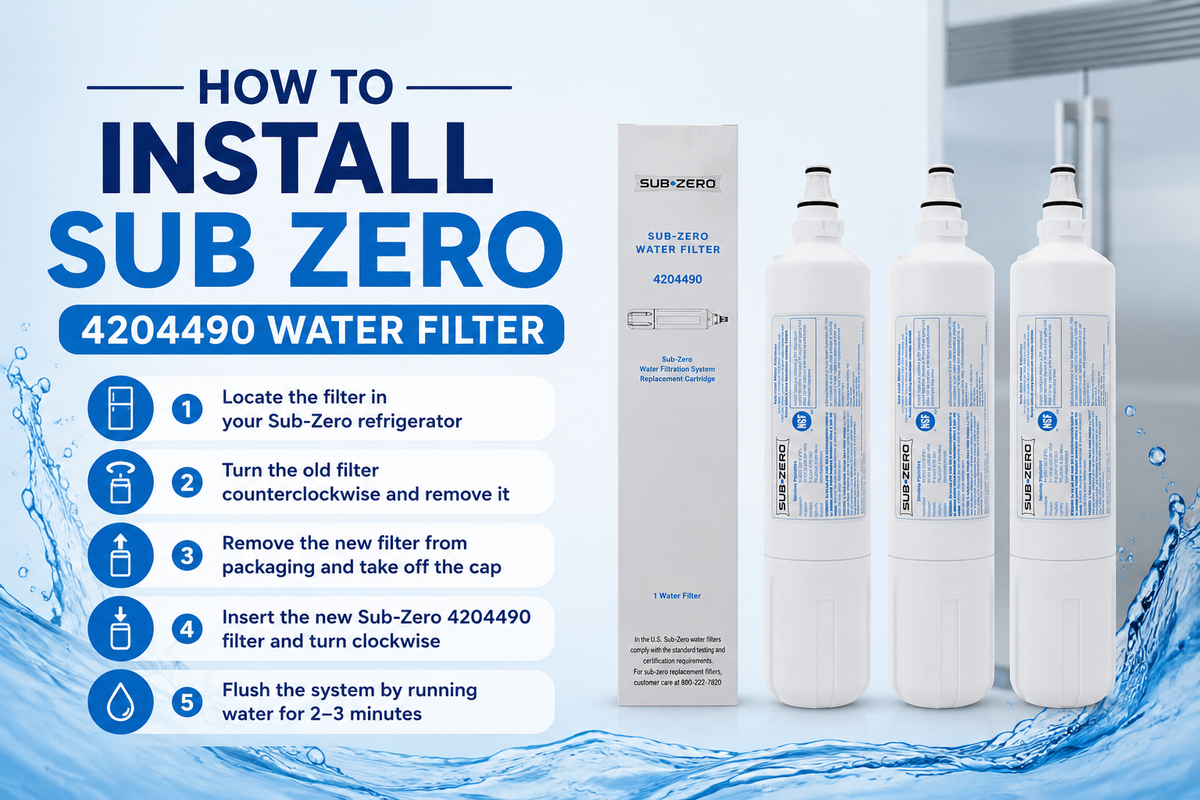
Installing a Sub-Zero 4204490 water filter generally involves removing the old cartridge, preparing the new filter, inserting it correctly, flushing the water system, and checking for proper operation. The exact filter access point and reset steps can vary depending on your specific Sub-Zero refrigerator model, so it helps to confirm your model before you begin.
Before you start, make sure 4204490 is actually the correct filter for your refrigerator. Proper Sub-Zero 4204490 installation matters more than it might seem, since a poorly seated cartridge can affect water flow, reduce filtration performance, and even cause leaks around the housing. Whether you are handling a Sub-Zero 4204490 replacement for the first time or simply learning how to replace Sub-Zero 4204490 correctly, this guide from Frost Water Filter walks you through every step so your Sub-Zero 4204490 filter installation goes smoothly the first time.
What Is the Sub-Zero 4204490 Water Filter?
The Sub-Zero 4204490 water filter is a specific replacement cartridge designed for compatible Sub-Zero refrigerators. It filters water supplied to both the dispenser and the ice maker, helping reduce sediment, chlorine taste, and other unwanted particles before the water reaches your glass or ice tray.
This is not a universal refrigerator filter. It is a specific part number, and using the wrong cartridge can lead to poor fit or reduced filtration performance. You may also come across the number 9030868 in Sub-Zero documentation, since it sometimes appears as an interchangeable part number for certain models. Even so, always verify your exact refrigerator model before assuming compatibility.
Before Installing the Sub-Zero 4204490 Filter
A little preparation now saves you from problems later.
Confirm Your Refrigerator Uses 4204490
Checking Sub-Zero 4204490 compatibility starts with the part number printed on your existing filter, then compare it against your refrigerator's model number and current manufacturer compatibility information. Don't rely on how the cartridge looks, since several Sub-Zero filters share a similar shape and size.
Check the New Filter
Before installation, confirm that the packaging is intact and free from visible damage. Double check the part number printed on the box matches 4204490. Remove any protective packaging or caps as needed, and compare the new cartridge side by side with the old one to confirm they match.
How to Install a Sub-Zero 4204490 Water Filter
A successful 4204490 water filter installation follows the same core steps regardless of your exact refrigerator model. Here is the complete process broken down into simple steps.
Step 1: Locate the Water Filter
Filter location varies depending on your Sub-Zero refrigerator model. Some models place the filter inside the fresh food compartment, while others locate it near the base grille. Check your owner's manual if you are unsure, and identify the filter housing clearly before attempting removal.
Step 2: Remove the Old Water Filter
Follow your model's specific release or twist mechanism to remove the old cartridge. Take it out carefully and avoid forcing it if it does not move right away. Keep a clean towel nearby, since a small amount of water may escape during removal.
Step 3: Prepare the New 4204490 Filter
Remove the new filter from its packaging and take off any protective caps or seals. Inspect the cartridge for damage before installing it. Confirm the new filter matches the old one and carries the correct part number.
Step 4: Insert the New 4204490 Filter
Align the cartridge with the filter housing according to your model's design. Insert it completely, following the specific locking or twisting mechanism your refrigerator uses. Make sure the cartridge sits fully seated before moving on.
Step 5: Lock the Filter Into Position
Proper seating prevents leaks and keeps water flow consistent. Avoid forcing the cartridge beyond its intended range of movement, since this can damage the housing. Confirm the filter feels securely locked in place before continuing.
Step 6: Flush the New Water Filter
Run water through the dispenser according to your refrigerator's instructions. Flushing removes trapped air from inside the cartridge and clears out initial carbon fines that often appear right after installation. Discard this initial water rather than drinking it.
Step 7: Reset the Filter Indicator
The reset process depends on your specific Sub-Zero model, so follow your refrigerator's control panel instructions carefully. Confirm the filter reminder resets properly before finishing up.
Step 8: Check Water Flow and Leaks
Run the dispenser and check whether water flows at a normal rate. Inspect the area around the filter for any signs of leaking, and confirm the cartridge remains securely seated. If problems continue, troubleshoot the issue before using the refrigerator normally.
How Much Water Should You Flush After Installing a 4204490?
Flushing exists to clear trapped air and remove initial carbon fines that naturally appear in a brand new cartridge. Since flushing amounts can vary by refrigerator and filter type, it is best to follow the instructions specific to your model rather than a single universal number.
Whatever amount your manufacturer recommends, remember that this initial water should be discarded rather than consumed, since it may still carry loose carbon particles from the new filter.
How Do You Know the 4204490 Filter Was Installed Correctly?
Run through this quick checklist to confirm everything is working as expected.
-
The filter is fully seated in the housing
-
The locking mechanism feels properly engaged
-
No water is leaking around the filter area
-
Water flow feels normal at the dispenser
-
Water runs clear after the initial flush
-
The filter indicator has been reset where applicable
-
Both the ice maker and water dispenser operate normally
What If the Sub-Zero 4204490 Filter Won't Come Out?
If your Sub-Zero 4204490 won't come out on the first attempt, don't panic. This is a common issue with a few simple fixes.
Check the Removal Mechanism
Confirm whether your specific model requires twisting, pulling, or a different release method entirely. Refer back to your refrigerator manual if you are unsure which approach applies.
Don't Force the Cartridge
Applying excessive force can damage the filter housing or the cartridge itself, potentially creating bigger problems than the stuck filter alone.
Check for Installation Problems
Sometimes a previous filter was not seated correctly to begin with. Incorrect positioning or added pressure can make removal more difficult than it should be.
When to Contact Sub-Zero Support
If the filter remains stuck despite following the correct removal method, or if the housing appears damaged, reaching out to Sub-Zero support or a qualified technician is the safer next step.
What If the New 4204490 Filter Is Leaking?
A Sub-Zero 4204490 leaking right after installation is usually caused by an easy-to-fix issue. Start by removing and reinstalling the filter correctly, since improper seating is a common cause of leaks. Check whether any packaging or protective material was accidentally left in place during installation. Make sure the cartridge sits fully seated in the housing.
Inspect both the cartridge and the filter housing for visible damage. If leaking continues after these checks, stop using the affected water system and follow Sub-Zero's manufacturer or service guidance.
What If Water Flow Is Slow After Installing the 4204490?
First, confirm the filter is fully installed and properly locked into place. Flush the filter again if you have not already done so correctly. Check for kinks in the water line and take a look at your household water supply pressure as well.
It is also worth considering whether the filter itself is restricted or defective. Keep in mind that persistent Sub-Zero water filter slow flow can sometimes have causes unrelated to the filter entirely, such as a water line issue elsewhere in the system.
What If the Water Tastes Strange After Installing a New Filter?
Temporary taste changes right after installation are fairly common and usually resolve after proper flushing. Make sure the old filter was completely removed and that the correct 4204490 cartridge was installed in its place.
If an unusual taste continues even after flushing correctly, it is worth investigating both the filter itself and your home's water supply for other possible causes.
Does the Sub-Zero 4204490 Need to Be Flushed Before Use?
Yes, following proper Sub-Zero filter flushing instructions is recommended before regular use. Manufacturers recommend this step because new filters often contain trapped air and small carbon fines that need to clear out before the water runs clean.
Rather than skipping this step, follow the specific flushing instructions for your Sub-Zero refrigerator and filter combination to get the best performance from your new cartridge.
How Often Should You Replace the Sub-Zero 4204490 Water Filter?
Timing your 4204490 filter replacement correctly keeps your water and ice tasting their best. Sub-Zero generally provides replacement guidance for compatible models, often tied to a set number of months or gallons filtered, whichever comes first. Some refrigerators include a filter life indicator that tracks usage automatically.
Water usage and water quality can influence how long a filter actually lasts in practice. Watch for common Sub-Zero 4204490 troubleshooting signs like slow water flow, changed taste, unusual odor, changes in ice taste, or a filter indicator notification, since these often mean replacement time has arrived sooner than expected. For more detail on timing, check our guide on how often should you replace refrigerator water filter.
Sub-Zero 4204490 vs. 9030868
Readers often search Sub-Zero 9030868 vs 4204490 while researching Sub-Zero water filter replacement options. Based on current manufacturer documentation, 9030868 sometimes appears listed as an interchangeable option alongside 4204490 for certain refrigerator models.
That said, interchangeable part numbers do not eliminate the need to verify your specific refrigerator's compatibility. Not every Sub-Zero model can use either part safely, so always double check before ordering. For a closer look at how these compare, our Sub Zero 4204490 refrigerator water filter product page includes detailed compatibility information.
OEM vs. Compatible 4204490 Replacement Filters
Choosing between genuine OEM filters and compatible third party alternatives comes down to a few key differences. OEM filters are made specifically for Sub-Zero refrigerators and typically come with manufacturer support and warranty coverage.
Compatible filters can offer similar filtration claims, but it is worth checking their NSF or ANSI certification carefully rather than assuming equal performance. Price is often lower with compatible options, though manufacturer support and warranty terms may differ significantly. Two filters that look nearly identical on the outside may not deliver the same filtration results, so always review certification and performance details before choosing a Sub-Zero compatible water filter.
Common Mistakes When Installing a Sub-Zero 4204490
-
Installing the wrong filter without confirming compatibility
-
Skipping the model verification step entirely
-
Forgetting to remove protective packaging before installation
-
Installing the cartridge in the wrong position
-
Failing to lock the filter correctly into place
-
Not flushing the new filter after installation
-
Forgetting to reset the filter indicator
-
Ignoring small leaks instead of addressing them right away
-
Assuming every Sub-Zero refrigerator uses the 4204490 part
-
Forcing a stuck filter instead of checking the release mechanism
Frequently Asked Questions
How do I install a Sub-Zero 4204490 water filter?
Locate the filter housing, remove the old cartridge, prepare the new 4204490 filter, insert and lock it into place, flush the system, reset the indicator if applicable, and check for normal water flow and leaks.
How do I remove the old Sub-Zero 4204490 filter?
Learning how to change Sub-Zero 4204490 filters starts with your specific model's release or twist mechanism, and avoid forcing the cartridge if it does not come out easily on the first try.
How do I know if my Sub-Zero uses 4204490?
Check your existing filter's part number and your refrigerator's model number, then compare both against current manufacturer compatibility information.
Does Sub-Zero 4204490 need to be flushed?
Yes, flushing removes trapped air and initial carbon fines from the new cartridge, and manufacturers recommend this step before regular use.
How much water should I flush after installing a 4204490?
The exact amount depends on your specific refrigerator and filter model, so following your manufacturer's instructions is more reliable than a single universal number.
How do I reset the Sub-Zero water filter indicator?
The Sub-Zero water filter reset process depends on your model's control panel, so check your owner's manual for the exact button sequence or menu option.
Why is my Sub-Zero 4204490 filter leaking?
Leaks often result from improper seating, leftover packaging material, or damage to the cartridge or housing, so reinstalling the filter correctly is the first step to try.
Why won't my Sub-Zero water filter come out?
This can happen due to an incorrect removal method or a filter that was not seated correctly during a previous installation. Avoid forcing it and check your manual for the correct release mechanism.
Why is my water flow slow after installing a new 4204490?
Slow flow can result from an improperly seated filter, insufficient flushing, a kinked water line, or even household water pressure issues unrelated to the filter itself.
Is Sub-Zero 4204490 the same as 9030868?
They sometimes appear as interchangeable part numbers for certain models, but you should always verify compatibility with your specific refrigerator before assuming they are identical.
How often should I replace the Sub-Zero 4204490?
Replacement timing depends on your model's specific guidance, often based on months of use or total gallons filtered, along with your household's water usage and quality.
Can I use a generic replacement for Sub-Zero 4204490?
Compatible filters exist, but it is important to check their certification and filtration claims carefully rather than assuming they perform identically to an OEM cartridge.
Final Verdict
A successful Sub-Zero 4204490 installation, or a straightforward Sub-Zero 4204490 replacement if you have done this before, comes down to a few key steps. Verify compatibility first, locate the filter housing, remove the old cartridge carefully, prepare the new 4204490 filter, install and secure it properly, flush the system thoroughly, reset the indicator if your model requires it, and finally check for normal water flow and any signs of leaking.
Model specific instructions should always take priority over general guidance, since Sub-Zero refrigerators can vary quite a bit in filter location and reset procedures. Following the manufacturer's own Sub-Zero water filter instructions ensures the best results for any Sub-Zero refrigerator water filter installation. If you need a genuine replacement cartridge, explore Frost Water Filter's Sub Zero Water Filter collection, including the Sub Zero 4204490 refrigerator water filter itself.
For more helpful guides, check out our articles on what a refrigerator water filter removes, how to clean a fridge water filter, how refrigerator water filters work, the benefits of changing refrigerator water filters regularly, how to recycle refrigerator water filters, the signs you need to replace your fridge water filter, our Sub Zero 4204490 water filter replacement guide, the comparison of Sub Zero refrigerator air filter vs water filter, Sub Zero water filter combo pack benefits, the Sub Zero 7042798 cartridge replacement guide, and our Sub Zero refrigerator maintenance checklist.
For additional background on how these systems work, you can also read this overview of water filters on Wikipedia.